Last updated: 10/12/2026
What is NCSIMUL? NCSIMUL is an advanced CNC machining simulation, verification, and optimization software developed by Hexagon. Unlike internal simulations found in CAD/CAM packages, NCSIMUL reads post-processed G-code directly to check machine kinematics, detect gouging, and optimize cycle times before any program is sent to the physical CNC machine.
In modern precision manufacturing, a spindle crash or broken high-end cutting tool can cost tens of thousands of dollars and severely disrupt project schedules. Implementing NCSIMUL machining simulation enables CAM engineers and shop floor managers to completely eliminate technical risks, ensuring stable production workflows and the highest quality standards.
Definition: What Is NCSIMUL Software in the CNC Manufacturing Ecosystem?
NCSIMUL is a digital manufacturing platform built on the analysis of true Numerical Control (NC) code. The solution creates a complete Digital Twin of the entire manufacturing shop floor, including the kinematic structure of 3-axis to multi-axis CNC machines (milling, turning, turn-milling), workholding systems, raw stock, and the exact geometry of toolholders and cutting inserts.
Originally developed by SPRING Technologies and now part of Hexagon Manufacturing Intelligence, NCSIMUL serves as the final quality control checkpoint between the CAM programming office and the machine shop. NCSIMUL does not replace a facility’s existing CAM software; instead, it integrates seamlessly with multi-axis solutions (learn more about what ESPRIT CAM is) as well as all mainstream CAM systems like Mastercam, NX, CATIA, PTC Creo, hyperMILL, and Tebis to guarantee machine code accuracy before live operation.
The Core Difference Between CAM Simulation and NCSIMUL Machining Simulation
Many machining engineers wonder: Why do collisions still happen on the physical machine when the toolpaths were already verified inside the CAM software? The answer lies in the blind spot between intermediate data and executable machine code.
Standard CAM software only simulates internal cutter location data files (CLDATA or APT code), which represent the theoretical trajectory before post-processing. In contrast, NCSIMUL reads and analyzes the final G-code/ISO file that the physical CNC machine executes. Every error stemming from macro programming logic, post-processor math bugs, cutter radius compensation (G41/G42), tool length compensation (G43), axis stroke limits, or repeated canned cycles is thoroughly isolated by NCSIMUL.
| Analysis Criteria | Internal CAD/CAM Simulation | NCSIMUL G-Code Simulation |
|---|---|---|
| Decoded Object | Theoretical tool trajectory (CLDATA / APT code) | Actual G-code loaded into the machine (ISO, Heidenhain, Siemens 840D, Fanuc) |
| Post-Processor Check | Cannot detect errors generated by the post-processor | Comprehensive 100% verification of post-processor output |
| Machine Kinematic Model | Often illustrative with simplified axes | Accurate 1:1 Digital Twin matching real mechanical structure |
| Micro-Collision Check | Limited to tool and part | Comprehensive: Tool, spindle, table, fixture, adapter, machine walls |
| Cutting Speed Optimization | Fixed feed rate assigned manually by programmer | Real-time analysis of chip volume and cutting forces (Optitool) |
| Dry-Run Time | Requires reduced speed and strict visual monitoring at the shop floor | Completely eliminates air cutting trials (100% Virtual Dry-Run) |
Breakthrough Features of NCSIMUL Software in Precision Mechanical Machining
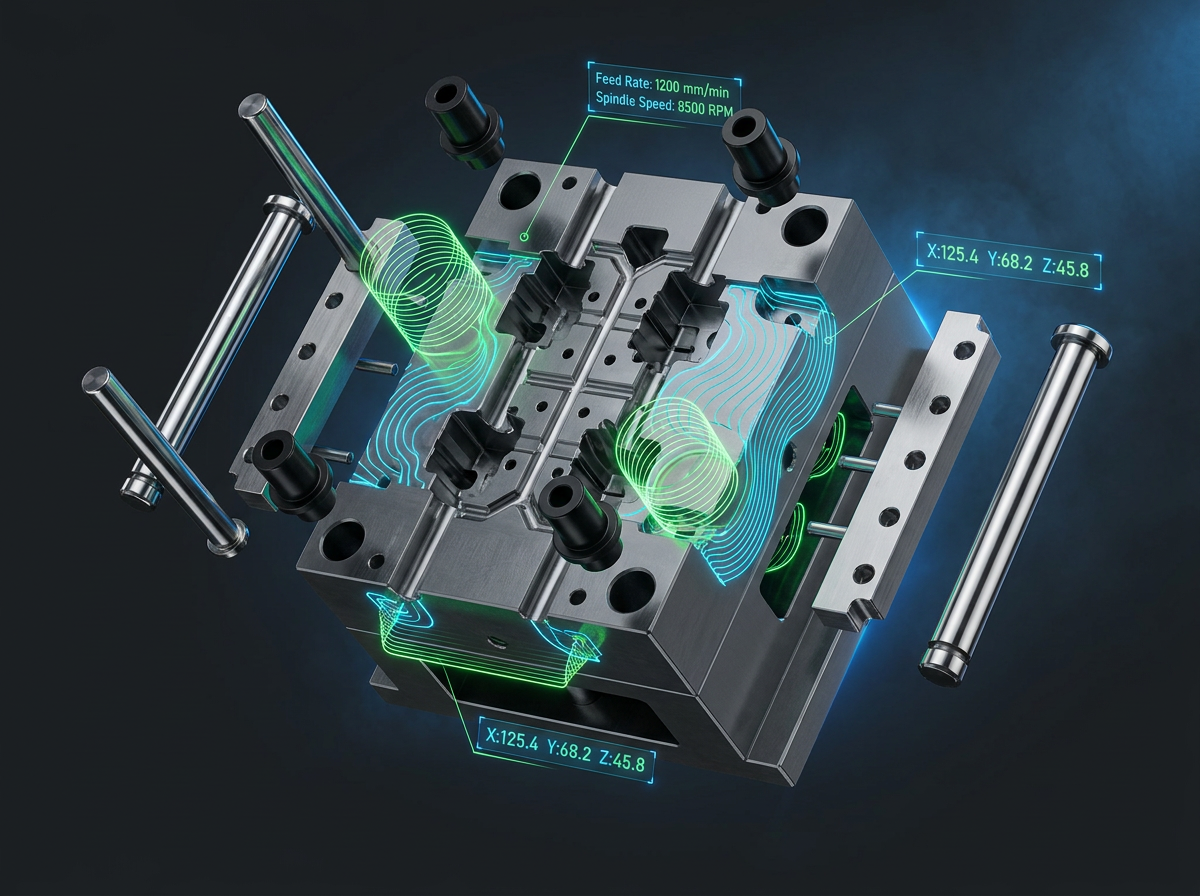
The NCSIMUL software ecosystem features a diverse modular architecture that covers the entire value chain—from NC code verification and productivity optimization to flexible line transfer.
Real-Time Kinematic Machine Simulation
NCSIMUL’s CNC machine simulation feature replicates the motion of every coordinate axis (Linear axes X, Y, Z and Rotary axes A, B, C) with ultra-high real-time graphic processing speeds. NCSIMUL’s algorithms accurately simulate acceleration behavior, deceleration, and singularities on 5-axis machines, helping programmers catch axis over-travel limits early before sending programs to the shop.
Multi-Dimensional Collision Detection and Surface Damage Prevention
NCSIMUL performs geometric intersection tests between all moving and stationary components within the machine space. The verification algorithm instantly flags severe collision scenarios such as tool shanks rubbing deep cavity walls, tool holders crashing into fixtures, rapid traverse moves (G00) piercing stock, or cutting tools gouging finished surfaces beyond allowable tolerances.
Optimizing Cutting Cycles with NCSIMUL Optitool
The Optitool module in NCSIMUL is a leading productivity optimization solution. By analyzing instantaneous chip load removal over each segment of tool movement, Optitool automatically adjusts feed rates:
- Accelerates to maximum speed during air-cutting moves to minimize wasted time.
- Reduces feed rates when entering sharp corners or sudden stock variations to prevent overloading and tool breakage.
- Maintains constant chip thickness, protecting spindle lifespan and extending the durability of turning and milling inserts.
Instant Machining Program Conversion with NCSIMUL 4CAM
When a 5-axis CNC machine in the workshop experiences unexpected maintenance downtime, reprogramming the entire part on another machine with a different controller (e.g., from Fanuc to Heidenhain or Siemens) usually costs CAM engineers hours of work. NCSIMUL 4CAM allows users to convert machining programs between different CNC machine brands with just a few clicks without reopening the original CAD/CAM file, automatically recalculating tool vectors and compensating for compatible fixtures.
5 Key Benefits of Deploying NCSIMUL Machining Simulation for Machine Shops
Investing in NCSIMUL machining simulation delivers clear profitability metrics for complex part manufacturing businesses:
- Crash-Free Guarantee: All NC command errors, coordinate system offsets (WCS – G54 to G59), or incorrect tool length setups are isolated and corrected directly in the digital space.
- Reduces Physical Machine Setup Time by 30% to 70%: CNC operators no longer need to keep a hand on the Emergency Stop button, dial down the feed override to 10%, or run dry-runs on wood or plastic stock. Programs processed through NCSIMUL are ready to machine at 100% speed immediately.
- Shortens Cycle Times by 15% to 25%: Thanks to Optitool’s segment analysis, intelligent feed rate adjustments save significant machining time per part, which is especially effective for batch production or large mold components.
- Preserves Tool Life and Reduces Spindle Wear: Eliminating mechanical shock loads as tools enter stock results in higher surface finish quality, dropping scrap rates to near-zero.
- Optimizes Personnel Capabilities: CAM programming engineers gain more independence in testing, and shop floor operators can run machines with confidence, free from the psychological pressure of potential crashes.
Workflow for Integrating NCSIMUL Into the Precision Engineering Production Chain
To maximize efficiency with NCSIMUL, manufacturing businesses typically standardize their approach using a 5-step engineering process:
- Build the Machine Tool Digital Twin: Import accurate 3D models of CNC machines from machine builders (Mazak, DMG MORI, Makino, Hermle, etc.), configure controller models, and set accurate kinematic limit parameters.
- Import G-Code Programs: Export NC code from any CAM software and load it directly into the NCSIMUL interface along with 3D fixture and raw stock models.
- Run Automated Simulation and Review Warnings: NCSIMUL scans all code blocks, highlighting lines with collision risks, travel limits, or gouges using intuitive color codes and detailed coordinates.
- Optimize Feed Rates with Optitool: Run chip load analysis so the algorithm automatically redistributes feed rates and overwrites the optimized G-code program.
- Transfer Clean Code to the Shop Floor: Load certified NC programs onto the CNC machine and begin actual cutting operations.
Which Industries Apply NCSIMUL the Most?
NCSIMUL machining simulation delivers peak value in manufacturing sectors requiring strict tolerances, high raw material costs, and complex machinery:
- Aerospace: Machining aircraft wing structures and turbine blisks from hard-to-cut materials like Titanium or Inconel. Raw aerospace billets can cost tens of thousands of dollars, making machining errors completely unacceptable.
- Mold & Die: Complex plastic injection molds and die-casting inserts featuring intricate contoured surfaces that require continuous high-speed machining (HSM) on 5-axis machines. NCSIMUL controls the risk of tiny tool breakage in deep cavities.
- Medical and Implants: Producing artificial knee joints and bone screws on multi-tasking and Swiss-type lathes with extremely tight machining spaces, where the risk of collision between tool holders is very high.
- Energy and Oil & Gas: Oversized valves and wind turbine blades that require large gantry milling machines to operate with absolute safety.
Solid & Soft – Authorized Hexagon Solutions Distributor in Vietnam
NCSIMUL is not merely a standalone software tool, but a strategic solution for the comprehensive digital transformation of precision manufacturing. To operate accurate CNC Digital Twin systems and synchronize post-processors with existing CAM software, businesses need support from experienced specialists.
Solid & Soft is proud to be an authorized Hexagon distributor in Vietnam, providing Hexagon’s manufacturing software and measurement solutions. Solid & Soft’s technical expert team is always ready to offer deep technical consulting, build custom Digital Twin machine models matching actual customer workshops, conduct technology transfer training, and help businesses purchase genuine NCSIMUL licenses backed by international-standard technical services.