
Last updated: November 2, 2026
An optimized video approval workflow for agencies and production houses is a sequence of smooth collaborative steps, moving from delivering rough cuts to finalizing approved files by leveraging specialized tools like the Dropbox Replay feature to comment directly on video timelines and maintain precise version control.
For media companies, design studios, and production houses ranging from 10 to 50 employees in Hanoi and Ho Chi Minh City, reviewing large 4K or RAW video files often comes with major operational hurdles. Slow file transfer speeds, feedback getting lost across fragmented chat channels, and constant confusion between rough cut iterations (v1, v2, final) are primary causes of project delivery delays.
Why Do Agencies Need to Standardize Their Video Approval Workflow?
Delays in approving draft cuts do more than just damage an agency’s reputation—they also drain server resources and waste valuable production time. When client feedback arrives via disconnected emails or instant messages, editors and designers can easily miss crucial details or misinterpret notes, leading to repetitive re-renders.
According to the Dropbox enterprise solutions overview, centralizing media assets onto a single cloud storage and collaboration platform minimizes the risk of data loss. At the same time, a clear workflow aligns expectations between the agency and the client right from the initial draft.
Steps to Build an Effective Video Approval Workflow with Dropbox Replay
To accelerate turnarounds and elevate deliverable quality, agencies and production houses can implement the 4-step standardized workflow below.
Step 1: Upload and Share Draft Links to Cloud Storage
Instead of transferring heavy video files via email or unsecured file-sharing services, editors upload draft cuts directly into a secure shared workspace. For heavy formats like RAW or 4K, high-speed cloud storage ensures smooth file access and link sharing.
Solid & Soft, as an official distributor of Dropbox in Vietnam, encourages businesses to adopt cloud storage solutions with granular access control, paired with effective Dropbox file access permission management. This safeguards an agency’s intellectual property and video copyright before public release.
Step 2: Utilize Timeline Commenting in Dropbox Replay
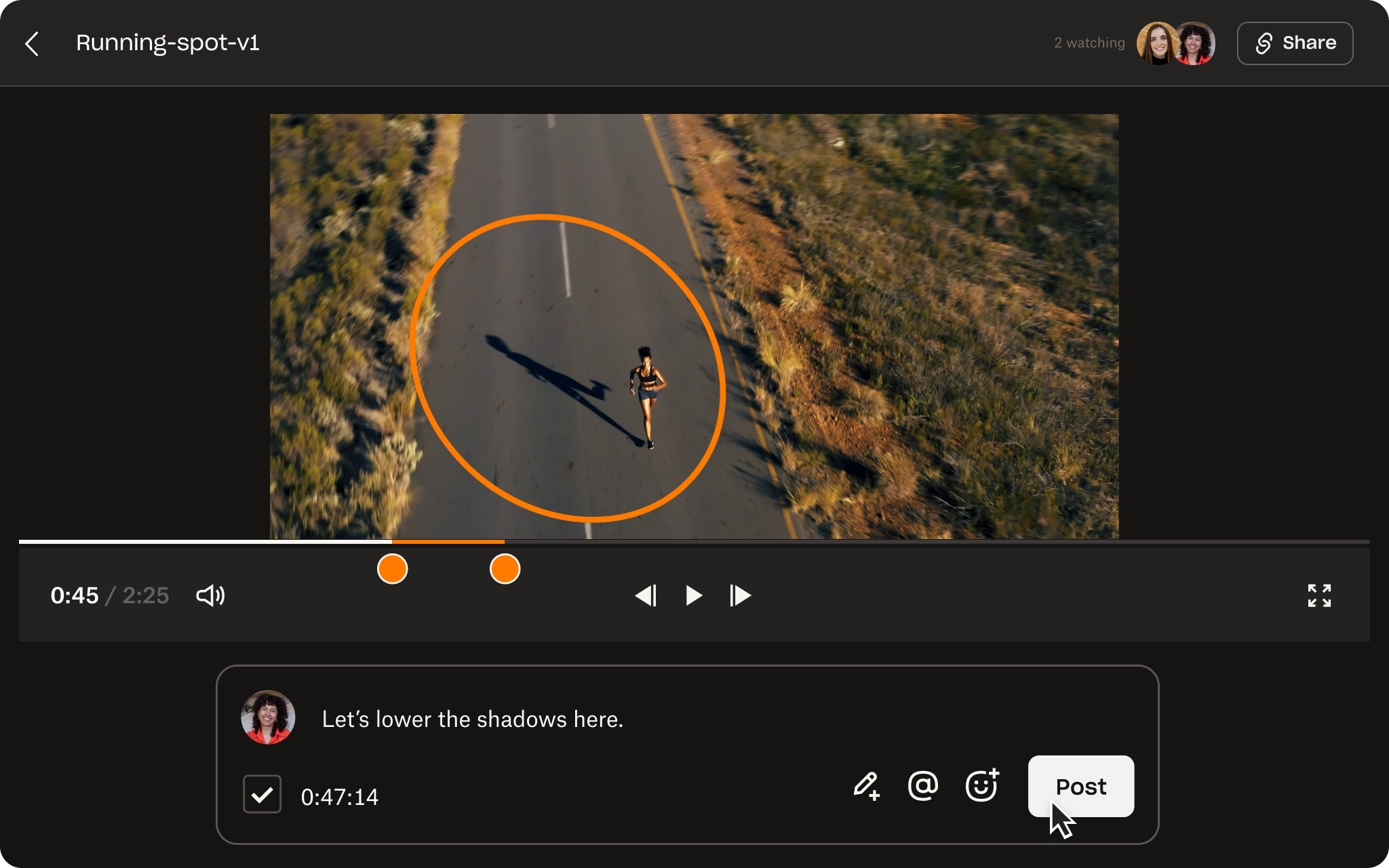
The key to cutting editing turnarounds lies in frame-accurate commenting. Instead of vague notes like “fix the middle section,” clients or creative directors can draw, annotate, and leave feedback directly at precise timestamps on the video timeline.
Editors review these notes directly within their working interface without toggling between messaging apps or Excel spreadsheets. Every revision request is transparently displayed alongside the visual asset, eliminating misunderstandings completely.
Step 3: Manage Version History to Prevent Confusion
Throughout video production, generating multiple draft iterations from preliminary cuts to final edits is inevitable. Dropbox Replay enables side-by-side version comparison, allowing managers and clients to verify whether previous feedback has been accurately addressed.
Strict version tracking prevents production teams from confusing review drafts with final cuts, minimizing the risk of handing off incorrect files to clients.
Step 4: Finalize Files Quickly and Archive RAW/4K Assets
Once full client approval is secured on the platform, the project transitions to completion. Source files (RAW/4K) and final deliverables are organized neatly in dedicated folders, freeing up local workstation storage for designers.
Through the Dropbox Business plans page, enterprises can easily scale long-term storage capacity without heavy hardware investments, while exploring options for Dropbox Business pricing to optimize budget allocation.
Benefits of Buying Licensed Dropbox via Official Distributor Solid & Soft in Vietnam
Small and medium enterprises in Vietnam often encounter friction with international payments and acquiring compliant VAT invoices for software licenses. Recognizing these challenges, Solid & Soft acts as a trusted bridge providing end-to-end local support:
- Providing full, valid VAT invoices in compliance with Vietnamese financial regulations for all software license purchases.
- Supporting flexible local payments in Vietnamese Dong (VND), removing barriers associated with international credit card transactions.
- A dedicated team of Vietnamese technical experts offering setup support, onboarding, and direct troubleshooting in Vietnamese.
Investing systematically in a streamlined video approval workflow using professional tools and authorized local distribution—such as when deciding to buy licensed Dropbox in Vietnam—serves as a solid foundation for agencies to enhance competitiveness and operational efficiency.
References
- Dropbox Sign: e-signature
- Dropbox features: store, share and collaborate
- Dropbox Help Center
- Dropbox for business