Last updated: 02/11/2026
The DocSend viewer management feature is an advanced solution designed for design studios, production houses, and media agencies to send portfolios and pitch decks securely, track exactly who opens them, and monitor detailed page-by-page engagement time. Instead of attaching heavy PDF files or sharing public links vulnerable to leaks (see our comparison on Dropbox vs Google Drive), adopting this document control workflow elevates brand professionalism and protects your intellectual property in every sales deal.
The Document and Portfolio Security Challenges Facing Media Studios
Media production studios and ad agencies frequently deal with sending large portfolios, campaign proposals, or detailed rate cards to prospective clients. Traditional file-sharing methods like email attachments, messaging apps, or standard cloud folders expose critical drawbacks:
- Loss of control after sending: Once a PDF or link is dispatched, you lose complete control over it. Clients can easily forward it to competitors or unauthorized third parties without your knowledge.
- Risks of creative concept leaks: According to Statista reports, data loss and intellectual property risks are rising among creative enterprises. Leaking unannounced designs or commercial pricing severely undermines your competitive advantage.
- Lack of real-time viewer insights: When attaching files, you remain completely blind to partner reactions: Have they opened the file? How long did they spend on it? Which pricing or project sample page captured their interest most?
Therefore, implementing DocSend viewer management represents a turning point, allowing businesses to digitize their document distribution in a smart, secure, and measurable way.
What Is DocSend Viewer Management and How Does It Work?
DocSend (a key platform within the Dropbox ecosystem) is purpose-built for secure document sharing and tracking. Unlike plain cloud storage, this platform focuses on tracking partner reading behavior in real time. You can explore the Dropbox solution overview to better understand this synergy between storage infrastructure and smart sharing tools.
When using this solution, instead of sending raw files directly, you simply send a secure link. Each link can be tailored to individual recipients. The system logs all reader actions—from IP address, device, and open times down to the exact seconds spent on each page. Similar to managing Dropbox file access permissions, this ensures sensitive project assets remain under your studio’s complete control.
Core Features for Optimizing DocSend Viewer Management
To run an efficient content delivery process for prospects, Account Managers and Creative Directors should fully leverage these advanced analytics features:
1. Detailed Page-by-Page Analytics
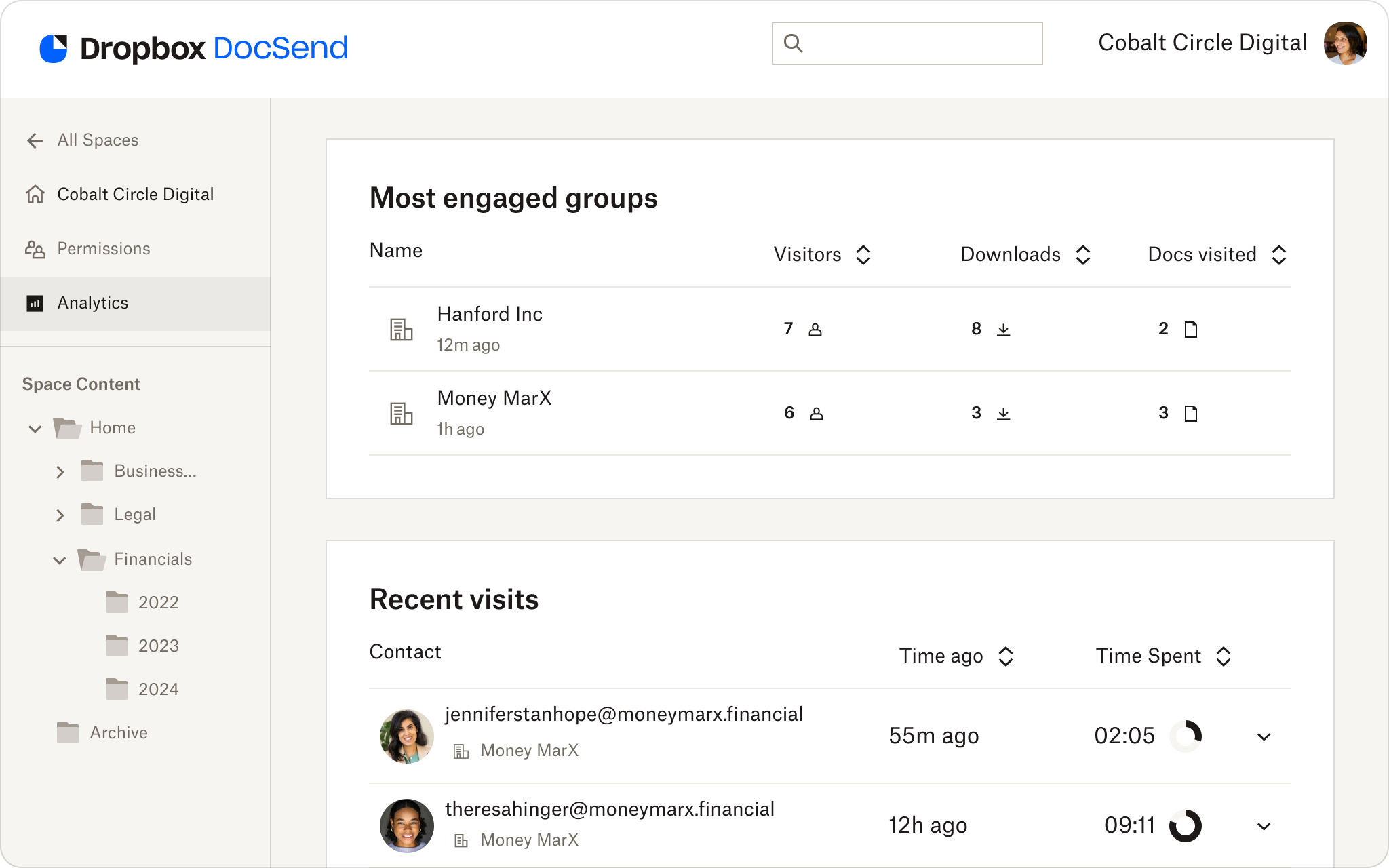
The platform provides a visual dashboard detailing the reader’s journey. You will know precisely which page was reviewed the longest, which pages were skimmed, and which were revisited. If a prospect spends 80% of their time reviewing your rate card or 3D animation case study, your sales team knows exactly what to highlight in the next follow-up call.
2. Viewer Identity Verification (Email Gating & Verification)
Require users to enter a verified email address before accessing the document. You can enable two-factor authentication (passcode sent to email) to ensure only authorized individuals open your portfolio, preventing impersonation or unauthorized views from unknown addresses.
3. Instant Access Control and Revocation
If a project design changes or you notice a link being forwarded to unauthorized parties, you can revoke access with a single click. The link is instantly disabled—even if the client currently has it open. This grants full control that static email PDFs can never offer.
4. Dynamic Watermarking to Prevent Copying
To protect raw concepts or unregistered creative work, enable dynamic watermarking. The system automatically overlays the viewer’s email and IP address on the content. If they take a screenshot or screen recording, their personal info is clearly displayed, effectively deterring unauthorized leaks.
5. Integrated Non-Disclosure Agreements (NDAs) and e-Signatures
According to technical documentation on the DocSend homepage, the platform allows you to insert a One-Click NDA or require an electronic signature before granting portfolio access. Clients don’t need to print, sign, and scan; they complete the legal agreement directly in their web browser.
5-Step Studio Workflow to Set Up and Control DocSend Viewers
To build a smooth, professional document-sharing workflow that maximizes sales conversions, creative studios should follow this 5-step standard:
Step 1: Prepare and Standardize Your Portfolio Format
Export your portfolio or pitch deck as a high-quality PDF. Ensure clear layouts, crisp visuals, and visible contact details. Upload this file to your secure workspace.
Step 2: Generate Unique Links for Each Prospect
Never use a single generic link for all prospects. Create a unique access link for each client (e.g., Client A, Client B) and name it after their company. This segregates tracking data accurately without mixing viewer behavior.
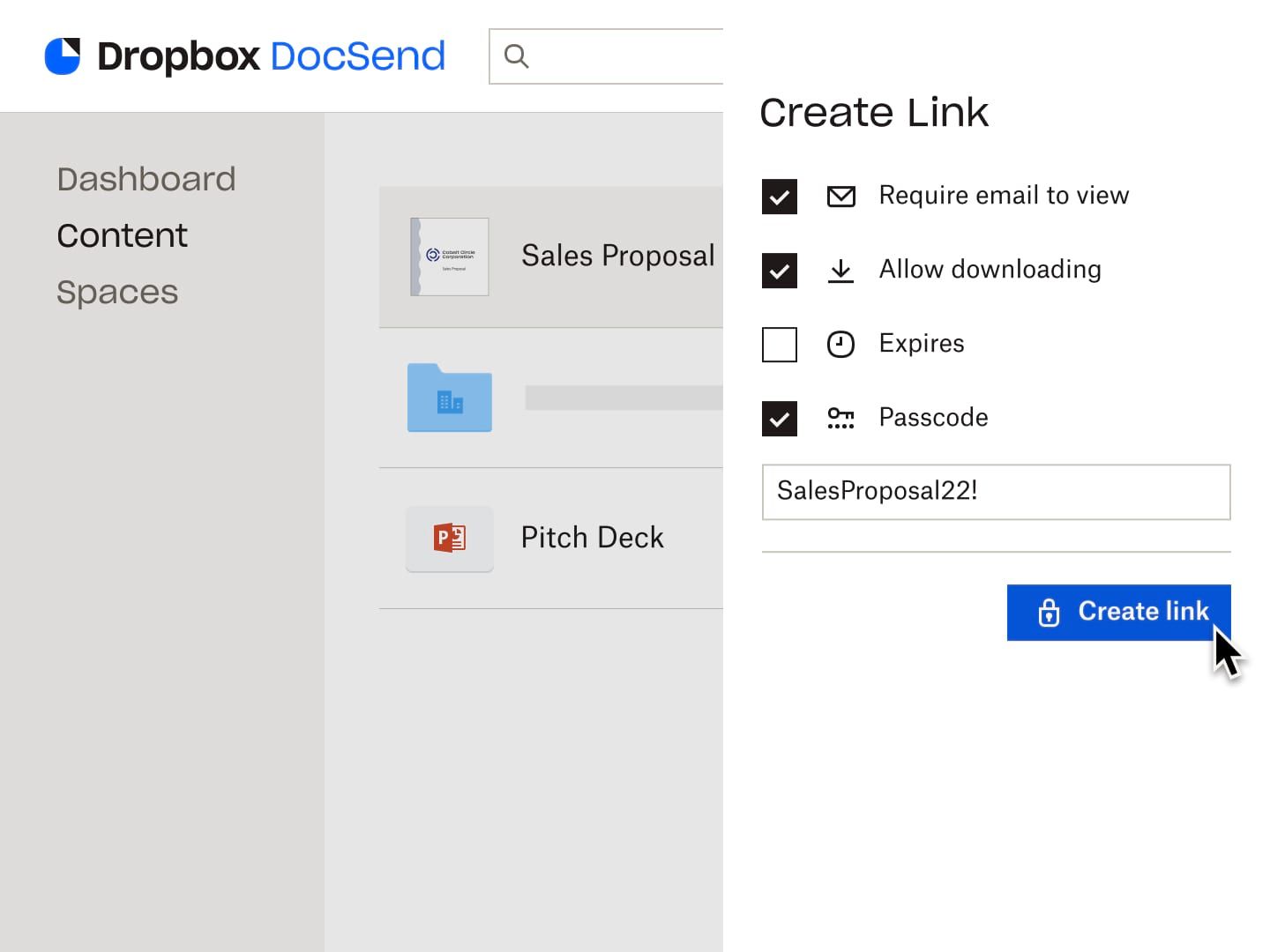
Step 3: Configure Link Security Settings
Depending on document confidentiality, toggle the appropriate options:
- Enable ‘Require Email’ for access identification.
- Disable ‘Allow Download’ to force online-only viewing.
- Set an Expiration Date (e.g., automatically lock the link after 14 days).
- Set a Passcode if the document contains sensitive financial data.
Step 4: Send the Link and Track Real-Time Notifications
Deliver the generated link via email or messaging app. When the client clicks to view, real-time notifications alert your sales team instantly via email or Slack.
Step 5: Analyze Data and Follow Up Proactively
Access your analytics dashboard to evaluate client engagement. If you notice a client spent 5 minutes on the video production rate card, follow up immediately via phone or email while your proposal is fresh in their mind. Research from Gartner shows that engaging prospects right when they are reviewing solutions significantly boosts deal-closing rates.
Document Sharing Comparison: Traditional Methods vs. DocSend
To highlight the return on investment, let’s compare traditional file attachment workflows against an integrated management solution:
- Emailing PDF Attachments: Limited file sizes (<25MB), zero visibility on whether files are opened, impossible to revoke wrong sends, easily forwarded.
- Standard Google Drive / Dropbox Links: Manual permission management, no page-level engagement metrics, viewer experience relies on third-party apps.
- DocSend Viewer Management Solution: Ultra-fast load times, mobile-optimized interface, real-time page-by-page reports, download blocking, and integrated NDAs all in one platform.
Boosting Deal Closing Rates with Viewer Insights
Analytics gathered from viewer tracking are more than just security measures—they serve as a powerful sales asset. Knowing that a prospect skipped the company background but thoroughly reviewed your process and case studies lets you tailor your next meeting around the exact value drivers they care about.
Purchasing Genuine DocSend Licenses in Vietnam via Solid & Soft
For small and medium enterprises in Vietnam, purchasing international software online via credit cards often presents obstacles regarding valid VAT invoices, foreign exchange rates, and lack of direct technical support. If your business needs to buy official Dropbox licenses in Vietnam, Solid & Soft—as the official distributor for Dropbox and DocSend in Vietnam—provides comprehensive licensing with legitimate tax invoices, VND payment support, and long-term technical backing.
Solid & Soft guarantees complete peace of mind regarding legal compliance, helping businesses optimize operational costs while receiving dedicated assistance from local experts. Upgrade your digital infrastructure and boost your competitive edge without bureaucratic hassle.
References
- Dropbox Sign: e-signature
- Dropbox features: store, share and collaborate
- Dropbox Help Center
- Dropbox for business